
Search Configuration for iManage
Shinydocs Streamlined Search supports OAuth 2.0 authentication with both iManage Cloud and on-premises iManage environments. This allows users to sign in using their existing iManage credentials, ensuring a secure and integrated experience.
On the iManage side
iManage Cloud
Contact iManage Support’s app registration team (appregistration@imanage.com) to request the following application in your iManage cloud instance with this information in the body:
Customer ID: <your iManage customer ID>
Customer name: <your organization name>
Application name: Shinydocs Pro Search
Application type: Web Type
Application description: App is used to authenticate users to check permissions when searching our local index
OAuth2 redirect URLs:
https://<shinydocs-search-server>:443/oauth/authorizedhttps://<shinydocs-search-server>:9701/oauth/authorizedhttps://localhost:9701/oauth/authorizedhttps://localhost:443/oauth/authorized
App Extension package attached: n/a

If you ever change your redirect URLs (e.g. you change the server name/dns name) you will need to contact iManage to update your redirect URLs
iManage support will then send you the client ID and secret key for the application.
iManage On-Premises

This guide assumes you already have iManage set up with OAuth 2.0. If your iManage instance does not have that integration enabled, please contact iManage support for configuration.
On-prem iManage environments expose similar OAuth 2.0 endpoints through your local iManage Work Web server. These are typically hosted at:
Authorization URL:
https://<your-imanage-server>/auth/oauth2/authorizeToken URL:
https://<your-imanage-server>/auth/oauth2/tokenRevoke URL:
https://<your-imanage-server>/auth/oauth2/revoke-token
Please follow the iManage guide for adding applications manually: Adding an application package - iManage Control Center, use the following in the application registration:
Name: Shinydocs Search
Description: Shinydocs iManage Search Integration
Client ID: c0e5d05b-f8b8-4a26-afbf-4fa6953489da
API Secret: [prepopulated] or select Auto-Generate
Publisher: Shinydocs Corporation
Website: http://www.shinydocs.com
Email: helpdesk@shinydocs.com
Type: Web
OAuth2 redirect URLs:
https://<shinydocs-search-server>:443/oauth/authorizedhttps://<shinydocs-search-server>:9701/oauth/authorizedhttps://localhost:9701/oauth/authorizedhttps://localhost:443/oauth/authorized
Confirm the exact base URL and endpoint availability with your system administrator. Your iManage Work Web server must have OAuth 2.0 enabled and properly configured.
In Shinydocs Control Center
With the application registered in iManage, you can now configure Shinydocs Control Center to use OAuth for real-time permission checking in Shinydocs Enterprise Search.
Either when adding a new iManage source or editing and existing source:
Select Protected - OAuth2 in the Search Authentication Type field
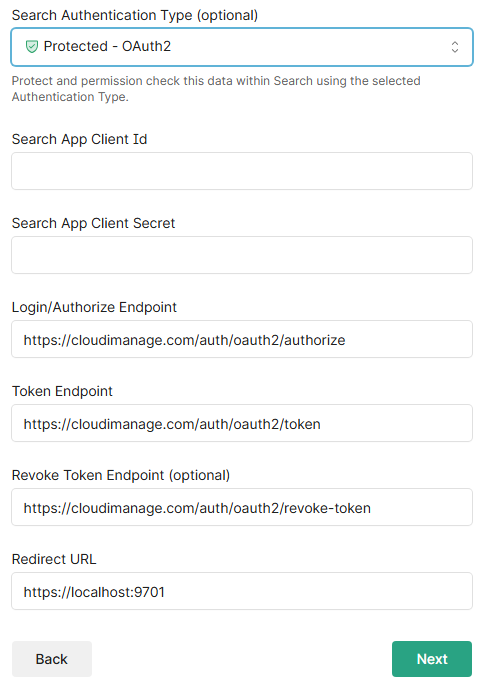
Enter the following values
Search App Client Id
iManage Cloud customers: Obtained from iManage support
iManage On Premise customers:
c0e5d05b-f8b8-4a26-afbf-4fa6953489da
Search App Client Secret
iManage Cloud customers: Obtained from iManage support
iManage On Premise customers: Obtained from iManage app registration
Login/Authorize Endpoint
iManage Cloud customers (use default):
https://cloudimanage.com/auth/oauth2/authorizeiManage On Premise customers:
https://<your_imanage_instance>/auth/oauth2/authorize
Token Endpoint
iManage Cloud customers (use default):
https://<your_imanage_instance>/auth/oauth2/tokeniManage On Premise customers:
Revoke Token Endpoint
iManage Cloud customers (use default):
https://cloudimanage.com/auth/oauth2/revoke-tokeniManage On Premise customers:
https://<your_imanage_instance>/auth/oauth2/revoke-token
Redirect URL
iManage Cloud customers:
Use the non-localhost redirect 443 or 9701 (whichever you will be using) URL you provided to iManage support for production environments
For non-production environments where you are only testing on the server Shinydocs Pro is installed on (not accessible from outside the server), use https://localhost:9701
iManage On Premise customers: Use the non-localhost redirect 443 or 9701 (whichever you will be using) URL you registered the application with. It must match and be valid.