
Problem
After updating Windows 10 with update version 1607, opening an Excel file or using the Save As feature in Excel, the document is not reserving.
Cause
The Windows 10 update removes the ShinydriveExcel Add-in from Excel.
Solution
The following steps assume that your ECM administrator has the Shinydrive Office Add-ins installed. Adding the ShinydriveExcel add-in, into Excel:
-
Open Excel
-
Select File → Options
-
Choose "Add-ins" on the left pane of the Excel Options window
-
Single click ShinydriveExcel, it will be located under "Inactive Application Add-ins"
-
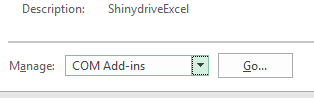
Select "COM Add-ins" from the Manage drop-down menu
-
Click "Go..."
-
-
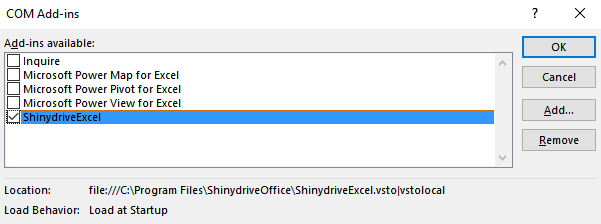
Check ShinydriveExcel
-
Click "OK"
-
Close Excel
-
Open an Excel document from Shinydrive
-
Note notification that file got Reserved (at the bottom right of screen).
-