
This article applies to Windows 10 and Server 2016
Problem
The notifications from Shinydrive in the Windows Action Center are not showing up anymore.

Cause
Sometimes, a Windows 10 update can reset some of your notification preferences.
Solution
You need to manually change the notification settings in Windows:
-
Click on the Windows Start Menu

-
Click the Settings icon

-
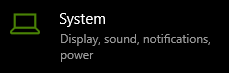
Click on System
-
Click on Notifications & actions

-
Scroll down the panel on the right and find the Shinydrive entry, turn it on
