
-
Download
shinydocs-indexer-visualizer-2022-08-25 (6.8.23).zip -
Right click > Properties > Unblock the zip
For index clusters (more than one Analytics Indexer), you will need to follow these steps on each machine. You only need one instance of Kibana (Visualizer). The most straightforward way is to proceed one by one.
-
Copy
shinydocs-indexer-visualizer-2022-08-25 (6.8.23).zipto each server running the Shinydocs Indexer service. -
Extract
shinydocs-indexer-visualizer-2022-08-25 (6.8.23).zip -
Locate your currently installed Shinydocs Indexer/Visualizer (eg.
D:\Shinydocs)
This section splits into different steps depending on if you are updating the Indexer or the Visualizer
Indexer
-
From
shinydocs-indexer-visualizer-2022-08-25 (6.8.23).zipextractshinydocs-indexer-6.8.23.zip -
Stop the Shinydocs Indexer service
-
In your currently installed Shinydocs Indexer directory (eg. D:\Shinydocs\Indexer), backup all files and directories EXCEPT for the
dataandconfigfolder, into a temporary backup folder.-
⚠Under no circumstances should you delete the
dataorconfigfolder! -
The only folders left in the Indexer directory should be:
-config
-data
-
-
Copy the contents of
shinydocs-indexer-6.8.23into the existing directory (eg. D:\Shinydocs\Indexer). When prompted to replace or skip files of the same name, select skip-
There should only be 2 files with the same name,
elasticsearch.ymlandjvm.options
-
-
Start the Shinydocs Indexer service
-
In a browser, go to
http://localhost:9200(or the port you configured). You should get a JSON response indicating the service is up and running. You will also be able to confirm the version number noted with{"version": { "number" : 6.8.23}}{ "name" : "CnyVsHR", "cluster_name" : "elasticsearch", "cluster_uuid" : "1bcZcKN-QBG6r0ZuYYcFNA", "version" : { "number" : "6.8.23", "build_flavor" : "default", "build_type" : "zip", "build_hash" : "4f67856", "build_date" : "2022-01-06T21:30:50.087716Z", "build_snapshot" : false, "lucene_version" : "7.7.3", "minimum_wire_compatibility_version" : "5.6.0", "minimum_index_compatibility_version" : "5.0.0" }, "tagline" : "You Know, for Search" } -
Remove the backup made in step 3
-
Proceed to the next server
Visualizer
-
From
shinydocs-indexer-visualizer-2022-08-25 (6.8.23).zipextractshinydocs-visualizer-6.8.23.zip(This can take a few minutes) -
Stop the Shinydocs Visualizer Service
-
In your currently installed Shinydocs Visualizer directory (eg. D:\Shinydocs\Visualizer), backup all files and directories EXCEPT for
..\config\kibana.ymlinto a temporary backup folder. -
Copy the contents of
shinydocs-visualizer-6.8.23into the existing directory (eg. D:\Shinydocs\Visualizer). When prompted to replace or skip files of the same name, select skip -
Start the Shinydocs Visualizer service
-
In a browser, go to
http://localhost:5601/status(or the port you configured). You should be presented with the Visualizer status page. Check that the version reported for all plugins are@6.8.23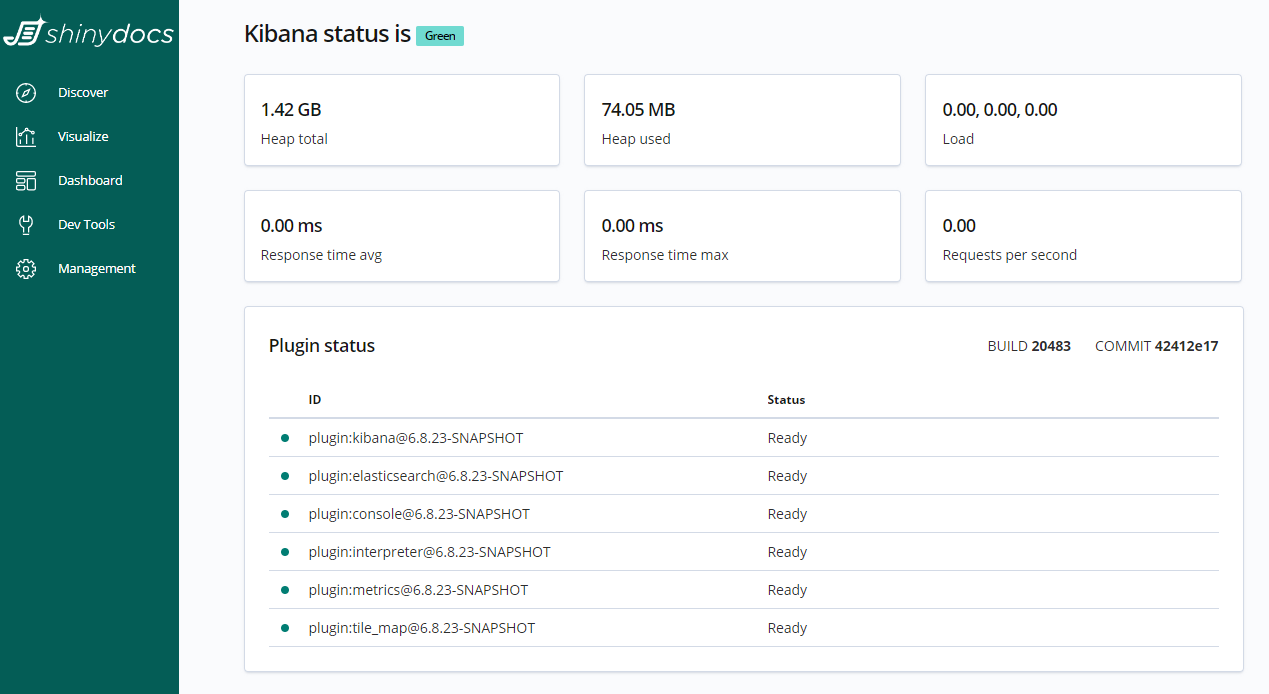
After the update is complete, you may notice a message in Kibana stating:
“In order to visualize and explore your data in Kibana, you’ll need to create an index pattern to retrive data from Elasticsearch”
If you encounter this message:
-
Navigate to the Management page in Kibana
-
Click on one of the blue index patterns
-
The index you select will become the default index pattern for the visualizer. This does not affect your data in any way. It simply is the default index that will be viewed in the Discover page of Kibana. You will be able to switch between all your indices/index patterns as before, Kibana just needs one as the default.
-
-
With your index pattern selected, click the ★ (star) button in the right-side panel
-
You will now be able to use the visualizer normally
Check out our (Archived) Changes when using Elasticsearch and Kibana 6.8.23 (Free Tier) instead of Shinydocs Indexer and Visualizer 6.8.23 page for more information on what’s new and what’s changed.