
There are two types of timestamps that most sites use. Relative timestamps display the number of minutes, hours, days, weeks, or years ago a post was published. Absolute timestamps display the exact date and time a post was published.

Shinydrive is set to display relative timestamps by default.
Enabling a Custom Date Format
-
Log into Shinydrive Admin
-
Navigate to GENERAL SETTINGS
-
Enable Custom Date Format
-
Enter the new date format
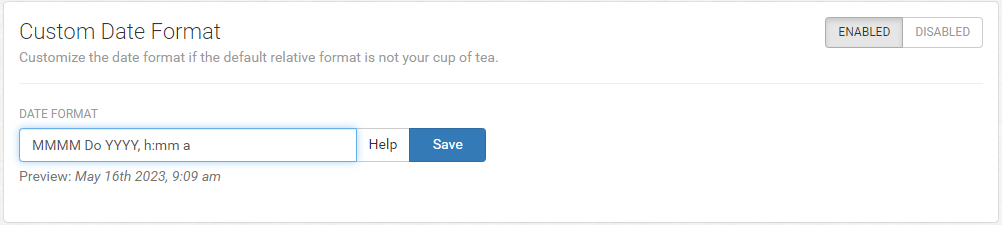
-
Review the Preview to validate
-
Save
Example Date Formats
-
MMMM Do YYYY, h:mm a
-
Preview: May 16th 2023, 9:09 am
-
-
MM/DD/YYYY hh:mm A
-
Preview: 05/16/2023 09:09 AM
-
-
LLLL
-
Preview: Monday, 16 May, 2023 9:09 AM
-
Supported Tokens
|
Meaning |
Token |
Output |
|---|---|---|
|
Month
|
M |
1 2 … 11 12 |
|
Mo |
1st 2nd … 11th 12th |
|
|
MM |
01 02 … 11 12 |
|
|
MMM |
Jan Feb … Nov Dec |
|
|
MMMM |
January February … November December |
|
|
Day of Month
|
D |
1 2 … 30 31 |
|
Do |
1st 2nd … 30th 31st |
|
|
DD |
01 02 … 30 31 |
|
|
Day of Week
|
dd |
Su Mo … Fr Sa |
|
ddd |
Sun Mon … Fri Sat |
|
|
dddd |
Sunday Monday … Friday Saturday |
|
|
Year
|
YY |
70 71 … 29 30 |
|
YYYY |
1970 1971 … 2029 2030 |
|
|
AM/PM
|
A |
AM PM |
|
a |
am pm |
|
|
Hour
|
H |
0 1 … 22 23 |
|
HH |
00 01 … 22 23 |
|
|
h |
1 2 … 11 12 |
|
|
hh |
01 02 … 11 12 |
|
|
Minute
|
m |
0 1 … 58 59 |
|
mm |
00 01 … 58 59 |
|
|
Second
|
s |
0 1 … 58 59 |
|
ss |
00 01 … 58 59 |
Supported Single Tokens (Canada)
There are also localized formats represented by a single Token that can be used.
|
Token |
Output – Canada (English) |
Output – Canada (French) |
|---|---|---|
|
LT |
12:12 PM |
12:12 |
|
L |
2017-04-27 |
2017-04-27 |
|
l |
2017-4-27 |
2017-4-27 |
|
LL |
April 27, 2017 |
27 avril 2017 |
|
ll |
Apr 27, 2017 |
27 avr. 2017 |
|
LLL |
April 27, 2017 12:12 PM |
27 avril 2017 12:12 |
|
lll |
Apr 27, 2017 12:12 PM |
27 avr. 2017 12:12 |
|
LLLL |
Thursday, April 27, 2017 12:12 PM |
jeudi 27 avril 2017 12:12 |
|
llll |
Thu, Apr 27, 2017 12:12 PM |
jeu. 27 avr. 2017 12:12 |