
Applying Hash Values
The Cognitive Suite provides the ability to calculate a hash value for each file by performing a one-to-one (byte-to-byte) comparison. If two or more files have the exact content, the hash value will be the same thus identifying it as a duplicate.
Have you done the initial crawl of your files? If not, you may want to refer to this page before applying the hash values.
Step by step:
-
Open a Windows command prompt as Administrator.
-
Change directory (cd) to where you extracted the shinydocs-cognitive-toolkit-yyyy-mm-dd.zip file
-
Run the command for a file share crawl to add hash: CognitiveToolkit.exe AddHashAndExtractedText --action-keyword hash --query {path-to-file} -u {url-to-index} -i {name of index}
The action-keyword option allows you to crawl for hash, text or both (default is both hash and text).
Shinydocs recommends use of the default hash+text for complex systems which typically have longer file download times (such as Content Server, SharePoint or FileNet, for example).
Adding hash and full text from a file share is possible, but not recommended. For file shares, Shinydocs recommends crawling for hash first and then crawling to extract text in a separate step.
|
Did you know… There are two ways to run tools in CLI:
Or
Example .bat file (COG-Query-AddHash-md5.bat) and .json file (query-match-path-no-hash.json): query-match-path-no-hash.jsonquery-match-path-no-hash.json
|
Visualize Your Duplicated Data
Before you begin, ensure that Analytics Engine and Visualizer has been installed. If not, refer to the installation instructions.
-
In a Web Browser (Chrome is recommended), enter the address for where Shinydocs Visualizer has been installed. This is typically <machine-name>:5601. If you are running the tool locally, use "localhost:5601".
-
From the Dashboard menu, open the basic dashboard for displaying metadata information: Duplicated Files
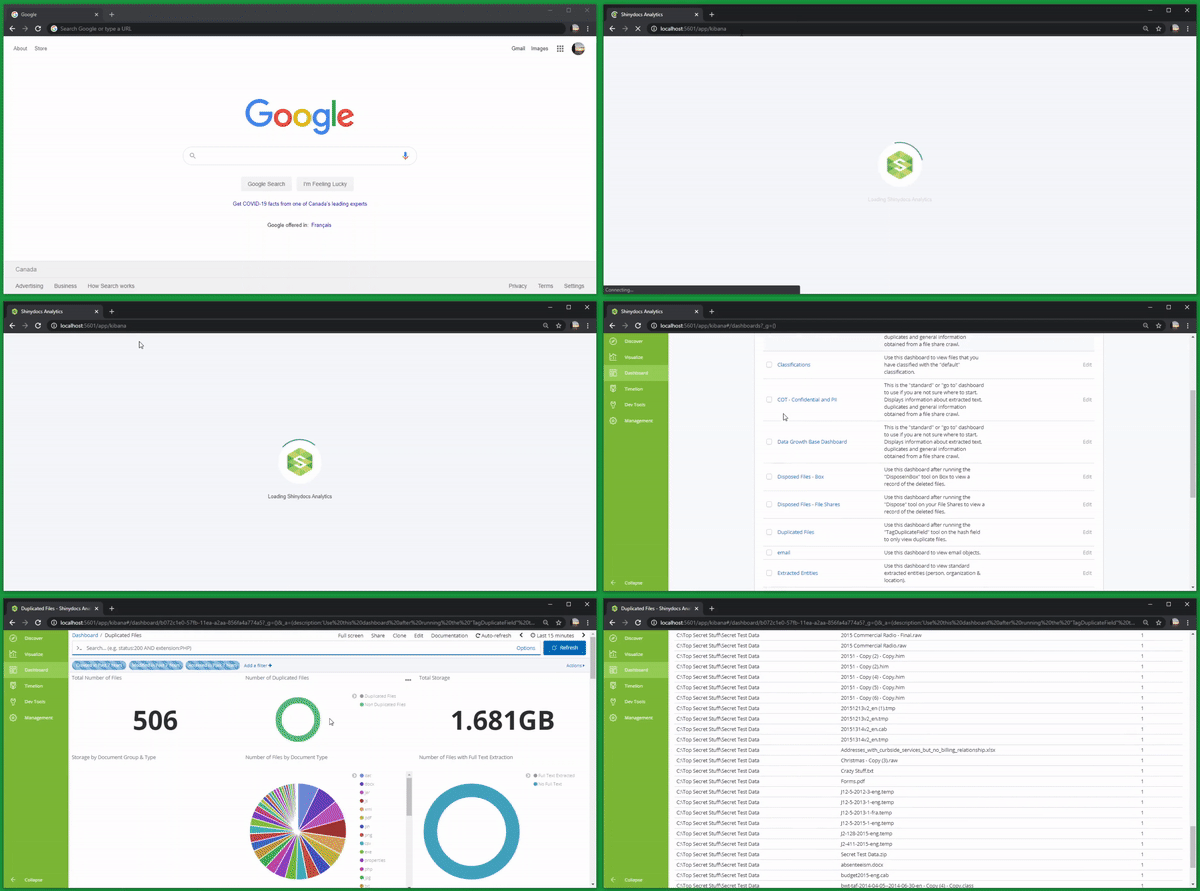
On this dashboard you will see a number of visualizations, each of which are based on a query of the underlying Analytics Engine.
The visualizations on this Dashboard include the following:
-
Total Number of Files
-
Number of Duplicated Files
-
Total Storage
-
Storage by Document Group & Type
-
Number of Files by Document Type
-
Number of Files with Full Text Extraction
-
Number of Files by Last Created Date
-
Number of Files by Last Modified Date
-
Number of Files by Last Accessed Date
-
Top Duplicated Files
-
File Listing by File Size
-
File Listing by Name
|
|
|
Did you know… There are other advanced features you can do with the AddHashAndExtractedText tool? Refer to the Encyclopedia of Cognitive Toolkit Operations to see a wider option of commands. |